
Cozi Alternatives: How to Choose a Family Organizer App and Switch Smoothly
Updated November 23, 2026
Cozi has helped families share one calendar and one shopping list for years. Some families now look elsewhere because of ads on the free version, features that need a paid plan, or a wish to keep chores and the household budget in the same app. This guide compares common options side by side and shows how to switch without losing your routine. Facts about Cozi were checked against Cozi’s plan comparison and FAQ on November 23, 2026.
Quick answer
- Check your calendar: Decide which events can come over through a calendar feed and which recurring events you’ll re-enter by hand.See how to move events
- Check everyone’s phones: If your family has both iPhone and Android, make sure every person can install the new app and sign in on their own phone.Compare the options
- Check what’s free for the others: Look at what the people you invite can use without paying, then pick by need: calendar only, lists and recipes, or the whole household in one place.See the comparison
Why families look for a Cozi alternative
In 2017, Cozi announced it had reached 20 million registered members in total. That is a sign-up count over the years, not the number of people using it each day. Here is what Cozi’s own pages say about the free version and the paid plans, plus the needs families mention when they compare apps.
- Ads: Cozi’s FAQ says the free version is supported by ads and sponsors. Cozi Gold is ad-free, and Cozi Max includes everything in Gold, so it is ad-free too.
- Paid features: Cozi’s plan comparison lists the month view on mobile and calendar search among the Gold features. Its FAQ says the free version lets you enter events from the Agenda view for the next 30 days, and that Gold removes this limit.
- Mixed phones and widgets: Families with both iPhone and Android often want the same calendar, lists, and Home Screen widgets on every phone.
- Everything in one place: Some households want chores with an owner, to-dos, and the household budget next to the calendar, instead of in separate apps.
Side-by-side comparison
Start with what your family used Cozi for most. If it was mainly the calendar, a calendar app may be enough. If it was the calendar plus lists and chores, look at apps that keep those together.
| Option | Google Calendar |
|---|---|
| Good fit for | Families who already use Google accounts |
| What to know | Free with a Google account on Android and iPhone. You share one calendar at a time and choose what each person can do. Lists live in a separate app, such as Google Keep. |
| Option | Apple Calendar |
|---|---|
| Good fit for | Families where everyone uses Apple devices |
| What to know | Built into iPhone, iPad, and Mac. Share an iCloud calendar, or use the calendar that comes with Family Sharing. Shared lists live in Reminders. |
| Option | TimeTree |
|---|---|
| Good fit for | Families and groups who mainly share a calendar |
| What to know | A calendar sharing app for iPhone and Android. It’s free to start, with a paid Premium tier. |
| Option | FamilyWall |
|---|---|
| Good fit for | Families who juggle more than one group |
| What to know | A family organizer that supports more than one circle (group). Its help page says one Premium subscription can upgrade up to five circles. |
| Option | AnyList |
|---|---|
| Good fit for | Families whose main need is shopping lists and recipes |
| What to know | List sharing is free on iPhone and Android. Meal planning is part of the paid AnyList Complete. |
| Option | ienon |
|---|---|
| Good fit for | Households with iPhone and Android who want plans, lists, and chores in one Home |
| What to know | Calendar, shopping list, to-dos, chores, household budget, anniversaries, and moods in one shared Home. Joining a Home, the shared calendar, lists, and basic widgets are free. The free plan shows ads. |
- Plans and features change. Check each app’s own pages before you decide.
- Calendar only: Google Calendar if anyone uses Android, Apple Calendar if everyone uses Apple devices, or TimeTree for a shared calendar app.
- Lists and recipes: AnyList, paired with a shared calendar.
- The whole household: FamilyWall or ienon, which keep the calendar, lists, and to-dos together. Before you switch, it can help to list the invisible tasks too.Mental load checklist: the invisible household tasks
How to switch smoothly without losing your family’s routine
Most of the work in switching is the calendar. Lists are short to copy, and chores are easy to set up again once you know who owns each one.
Moving your calendar and lists
- 1Look at the weeks Cozi lets you view and write down every event, including the ones that repeat. On Cozi Free that is the next 30 days. For events further out, check a read-only iCal feed of your Cozi calendar or the original calendar the events came from.
- 2Cozi’s FAQ describes read-only iCal feeds that show Cozi events in Google, Outlook, or Apple Calendar. A read-only feed is handy for a short overlap, but you can’t edit those copies.
- 3Re-enter recurring events (school, practices, appointments) in the new app as repeating events, so you can change them later.
- 4Copy your shopping list and open to-dos, and give each to-do an owner and a due date.
- 5Use both apps for one week. When everyone checks the new app first, stop adding events to Cozi.
- If you have an .ics file or a text list: If you have an .ics calendar file or a grocery or to-do list as text, the free preview tool reads it in your browser: preview the events in the .ics file, and turn the list text into a checklist. Then copy the events and items into ienon by hand. Repeating events show a label in the preview, so set the repeat again when you add them in ienon.Family calendar & grocery list preview
How to set up your family in ienon
- 1Create your Home: sign in with Google (on Android) or with Apple or Google (on iPhone), and choose “Start fresh”. Check the Home name, then tap “Create this Home”.
- 2Invite your family: open the top-left menu in “Home”, tap “Invite”, then tap “Copy Invite Link” and send it. An invitation link or QR code can invite up to 5 people and is valid for 7 days.
- 3Add events: tap + in “Calendar”, enter the title, start and end times, and assignees, then tap “Save”. Leave “Add to personal schedule” unchecked so the Home can see it.
- 4Import device calendars: open the calendar settings icon and choose “Import other calendars”. For each calendar, choose “Only me”, “Share with group”, or “Do not share”, then tap “Import”.
- 5Add the shopping list and to-dos: tap + in “Shopping” for items. For a to-do, open “Todo”, tap +, and type the task’s title first, since “Add” stays off until the task has a title. Then choose the “Assignee” and the “Due” date, and tap “Add”.
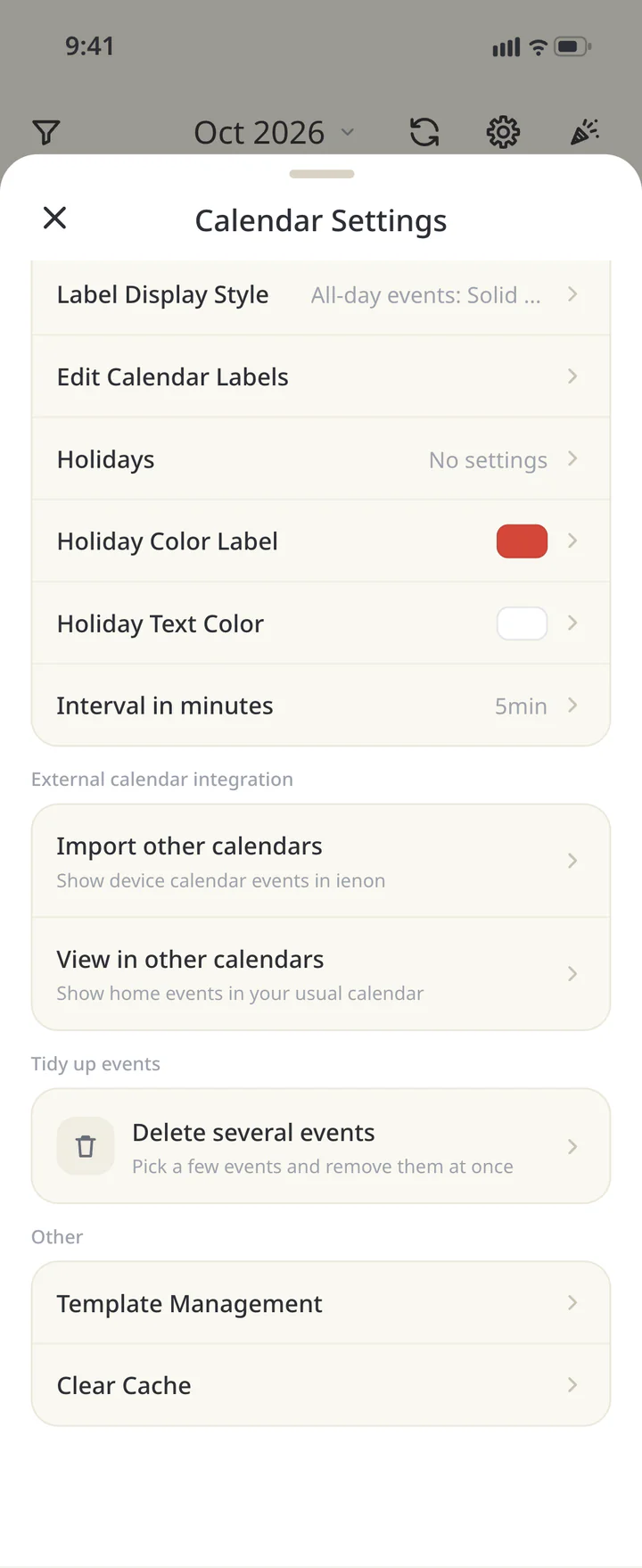 Open calendar import
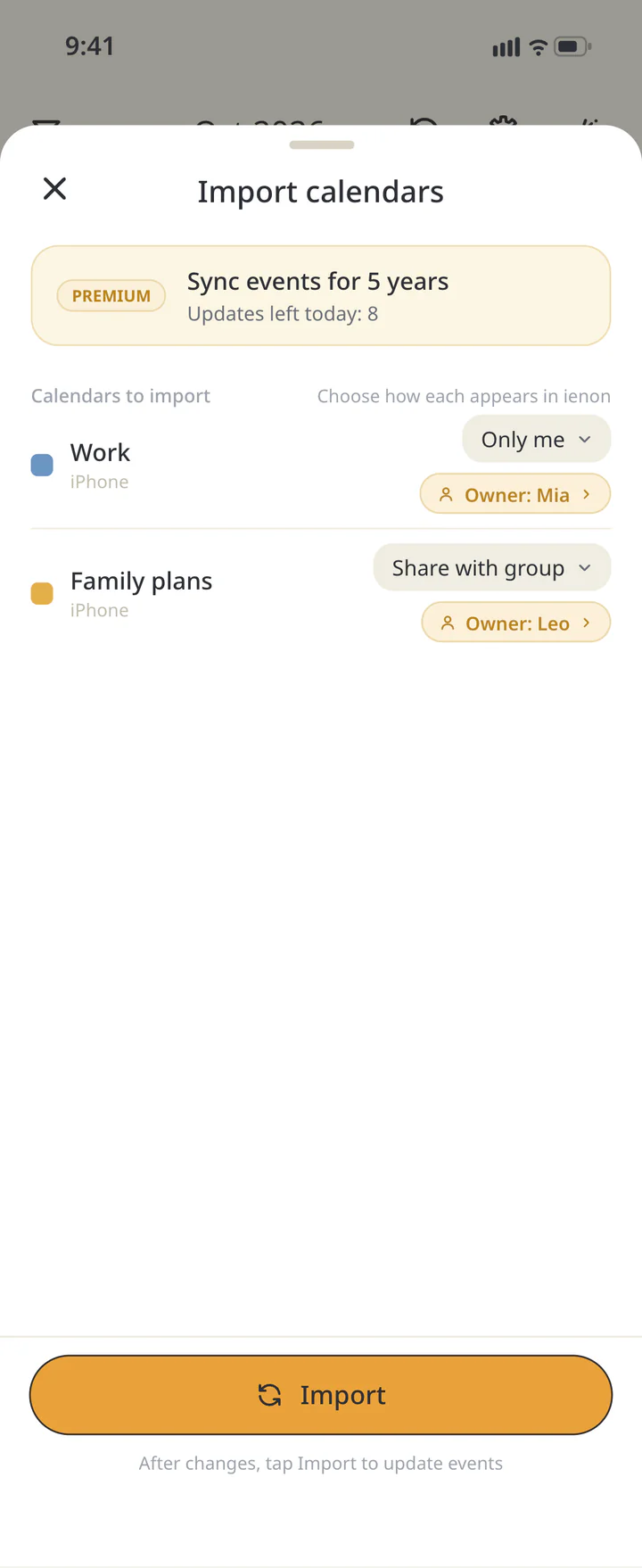 Choose visibility for each calendar
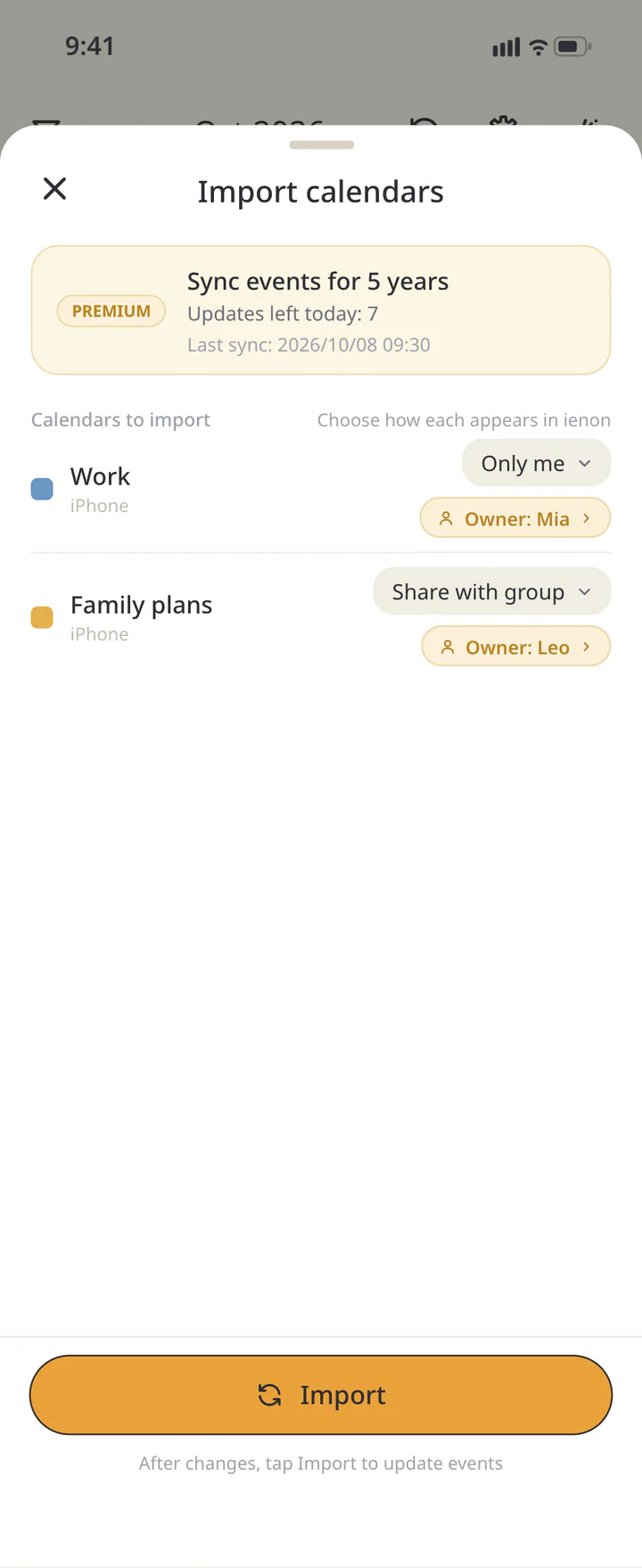 Import and check the result


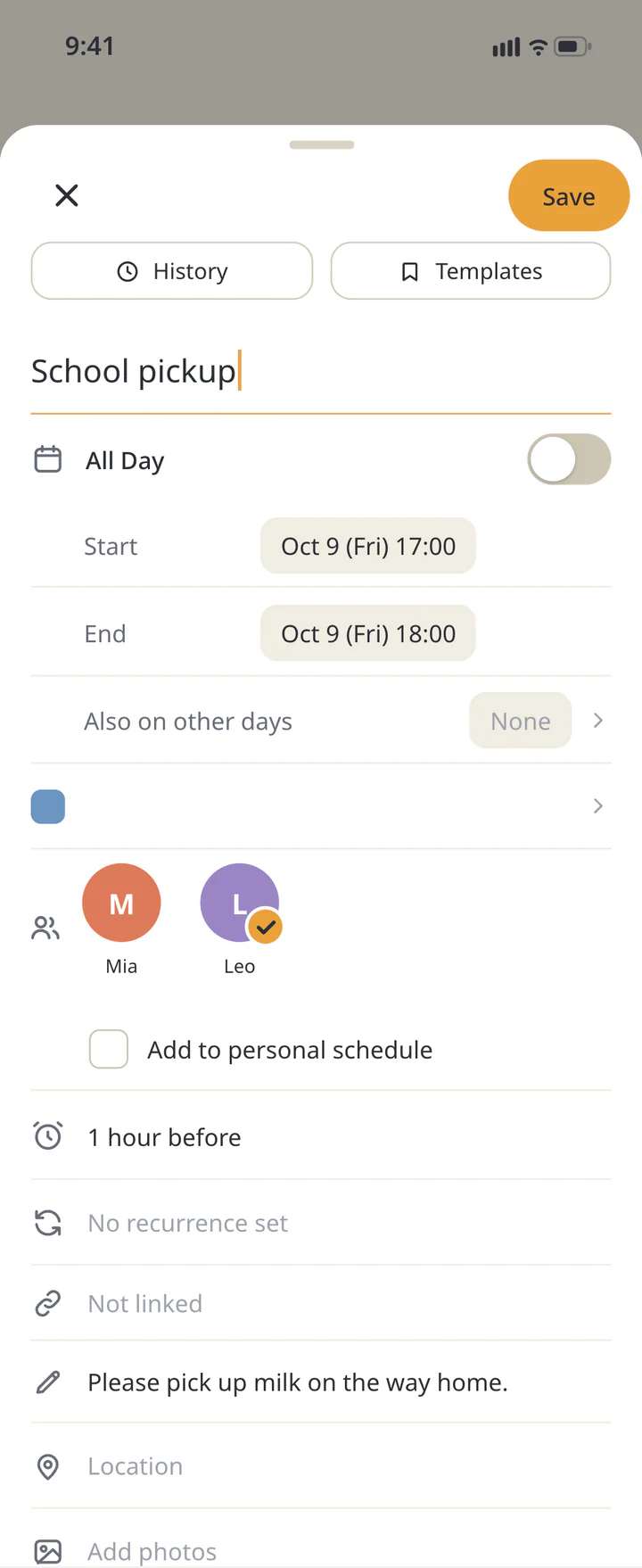

Things to know in ienon
- Everyone installs it: Each person installs ienon on iPhone or Android and signs in with their own account. On Android, sign in with Google. Sign in with Apple isn’t available on Android; it appears on iPhone and on the web. You don’t need to share login details.Invite someone to your Home
- No Cozi import: There is no direct import from Cozi. The import reads calendars that are already in your phone’s calendar app. Check that the calendar you need appears in the import list.Set event privacy and connect calendars
- Re-importing device calendars on the free plan: In ienon version 16.5.1 on the free plan, changes made in another calendar don’t always appear right away. To bring them in, open the calendar settings icon, choose “Import other calendars”, and tap “Import” again.
- Free and Premium: The shared calendar, shopping list, household budget, to-dos, chores, and messages are free to use with the people in your Home. The free plan shows ads. Premium removes ads and adds Inventory and more, and one subscription covers everyone in the Home.
Frequently asked questions
QWhat does the free version of Cozi include?
Cozi’s FAQ says the free version is supported by ads and sponsors and lets you enter events from the Agenda view for the next 30 days. Cozi’s plan comparison lists features such as an ad-free experience, the month view on mobile, and calendar search for Gold.
QCan I move my Cozi calendar to another app?
Cozi’s FAQ describes read-only iCal feeds to Google, Outlook, and Apple Calendar. For events you want to keep editing, re-enter them in the new app, starting with recurring events and the next few weeks.
QWhich apps work when one of us has an iPhone and the other has Android?
Google Calendar, TimeTree, FamilyWall, AnyList, and ienon all have iPhone and Android apps. Apple Calendar sharing works best when everyone uses Apple devices. In ienon, Android users sign in with Google, and Sign in with Apple is available on iPhone and on the web.
QIs there a way to check an .ics file or list before moving it?
Yes. If you have an .ics calendar file or a grocery or to-do list as text, the free preview tool shows the events in the file and turns the list into a checklist in your browser. Nothing is uploaded. There is no direct import from Cozi, so copy what you need into ienon by hand and set repeating events to repeat again.Family calendar & grocery list preview
QDoes my partner have to pay to join ienon?
No. Joining a Home is free, and the shared calendar, shopping list, to-dos, and chores are free to use. The free plan shows ads. One Premium subscription covers everyone in the Home.
QCan we try something in a browser before installing an app?
Yes. The free shared tools work in a browser with a link, and the Mental Load & Chore Split Check shows how household work is split today.Free shared toolsMental Load & Chore Split Check
Sources
- Cozi, Compare Plans: Free, Gold, and Max. Accessed November 23, 2026.cozi.com/compare-plans
- Cozi, Family Organizer FAQs. Accessed November 23, 2026.cozi.com/faq
- Cozi, “Cozi Reaches 20 Million Members” (August 7, 2017). Accessed November 23, 2026.cozi.com/blog/20-million-members
- FamilyWall Support, “How many circles can I have with a FamilyWall Premium subscription?” Accessed November 23, 2026.support.familywall.com
- AnyList Help, Getting Started. Accessed November 23, 2026.help.anylist.com
- TimeTree, official website. Accessed November 23, 2026.timetreeapp.com
One family calendar for iPhone and Android
With ienon, everyone in the same Home shares the calendar, shopping list, to-dos, and chores. ienon is free to start.