

Roommate Chore Chart
A free tool from ienon, the shared app for families, couples, and roommates↓
Pick your chores, trash days, and the people you live with. You'll get a 4-week chore chart that helps everyone take turns. It works for roommates (housemates or flatmates), couples, and families.
Make your chore chart
People
- 1
- 2
Just pick a label. You don't type any names. Turns go in this order.
Week starts on
Pick cleaning chores
Pick trash and recycling tasks
Pickup days depend on where you live. Check your local trash and recycling schedule and pick the days. Names and sorting rules vary too, so pick the closest one.
Chores picked: 0/10
Days and turns
Pick chores above. Then set the days and who does each one here.
Keep the rotation going in ienon
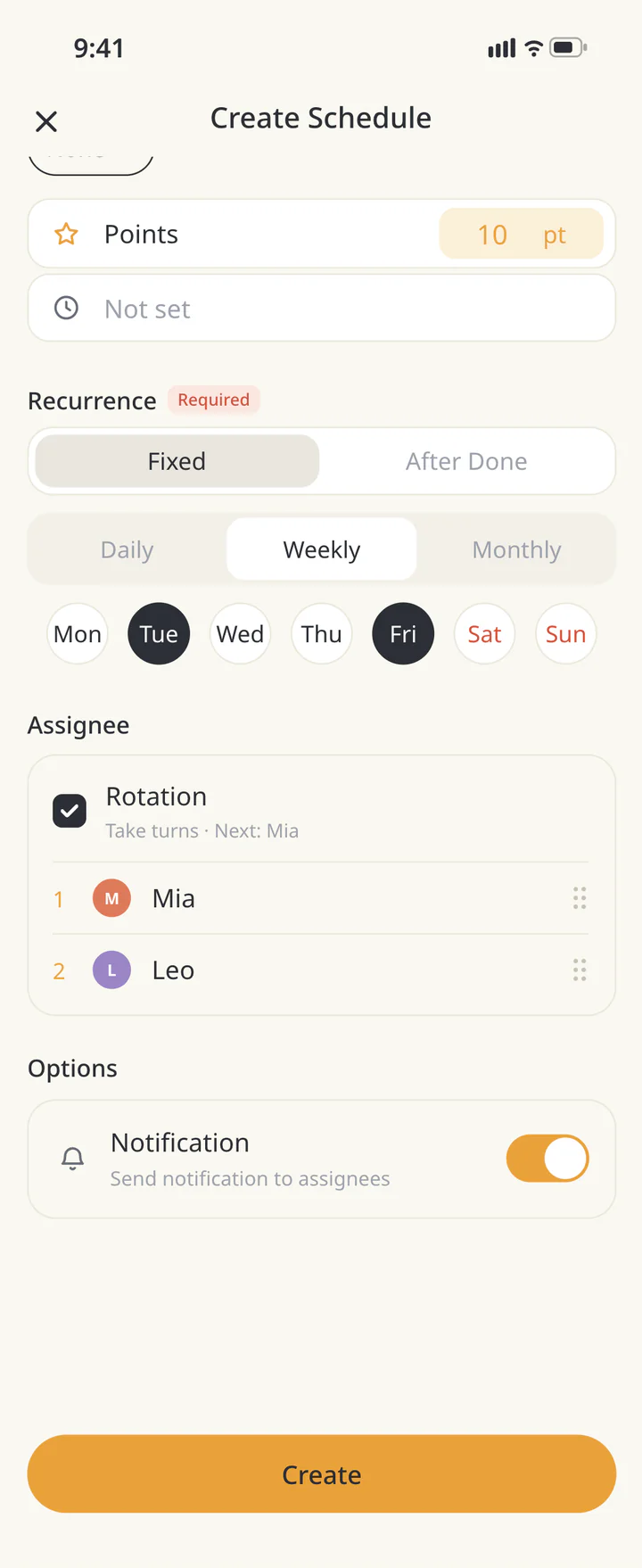
In ienon, open “Chore” and use “Create Schedule” to set a chore to repeat on the days you pick. Recurring schedules add the chore to “Duty” (the duty schedule) on those days. Select “Rotation” under “Assignee,” and the people you pick take turns in order. Turn on “Notification” to send a notification to assignees. ienon is a shared app for couples, families, and roommates. Share calendars, household budgets, shopping lists, and chore rotations with your Home.
- 1Install ienon, create a Home (your shared space in ienon), and invite the people you live with
- 2In “Chore,” tap + and choose “Create Schedule.” Enter the chore name
- 3Under “Recurrence,” choose “Weekly” and pick the days you chose on this page
- 4Under “Assignee,” pick the people who share the chore. To take turns, select “Rotation”
- 5Under “Duty,” see who's up “By Date,” “By Person,” or “By Chore”
ienon is free to start.
The chart on this page is not added to the app automatically. In the app, set up each chore once, and it repeats every week.
In the app, “Rotation” moves to the next person each time the chore comes up, not each week.
How the chart works
- Take turns (weekly)
- A chore set to “Take turns (weekly)” moves to the next person each week it comes up. An every-other-week chore moves on only in the weeks it happens. Turns follow the order of the people you pick.
- Who starts
- The chart chooses a starting person for each rotating chore to help balance everyone's total turns over 4 weeks.
- Same person every time
- To give a chore to one person, choose “Always Me” (or another person) under “Who does it.”
- Turns per person
- Each chore on the chart counts as one turn. Time and effort aren't counted.
- 4 weeks and printing
- The chart covers 4 weeks from the week you pick. It prints on one landscape page, Letter or A4, and is easy to read in black and white.
About trash days
- This page doesn't have pickup schedules for any city or town. Check your local trash and recycling schedule and pick the days yourself.
- Names and sorting rules for trash (rubbish in the UK) vary by area. Pick the closest name.
- For pickups every other week, use “Choose weeks” to turn off the weeks with no pickup. Weeks 1–4 count from the first day of this chart, not from the start of the month.
Chores you can pick
Choose up to 10 chores from 9 cleaning tasks and 6 trash and recycling tasks.
See all chores+
Cleaning
- BathroomClean the toilet, sink, and shower or tub
- KitchenWipe the counters, stovetop, and sink
- DishesWash the dishes, or load and unload the dishwasher
- VacuumVacuum the floors and rugs
- MopMop the hard floors
- DustingDust shelves, tables, and other surfaces
- WindowsClean the windows and mirrors
- FridgeToss old food and wipe the shelves
- Tidy upPut shared things back where they belong
Trash and recycling
- Empty trash cansEmpty the small trash cans into one bag
- TrashTake the trash out for pickup
- RecyclingTake the recycling out for pickup
- CompostTake out food scraps or compost
- Yard wasteTake out yard waste for pickup
- Bring bins inBring the bins back in after pickup
How your entries are handled
- The people, chores, and days you pick are not saved on our server. They stay only in the link and on this device.
- The link includes only the labels you picked for each person, chore numbers, days and weeks, who does each chore, and the start date. No names are included.
- Anyone with the link can see the chart. Only send it to the people you live with.
More free tools
Mental Load & Chore Split Check
Send the link to your partner and see where you two see it differently.
Weekly Meal Planner
Plan a week of dinners and get a grocery list sorted by store section.
Potluck & volunteer sign-up sheet
Share one link so guests can grab a spot, switch, or cancel without an account.